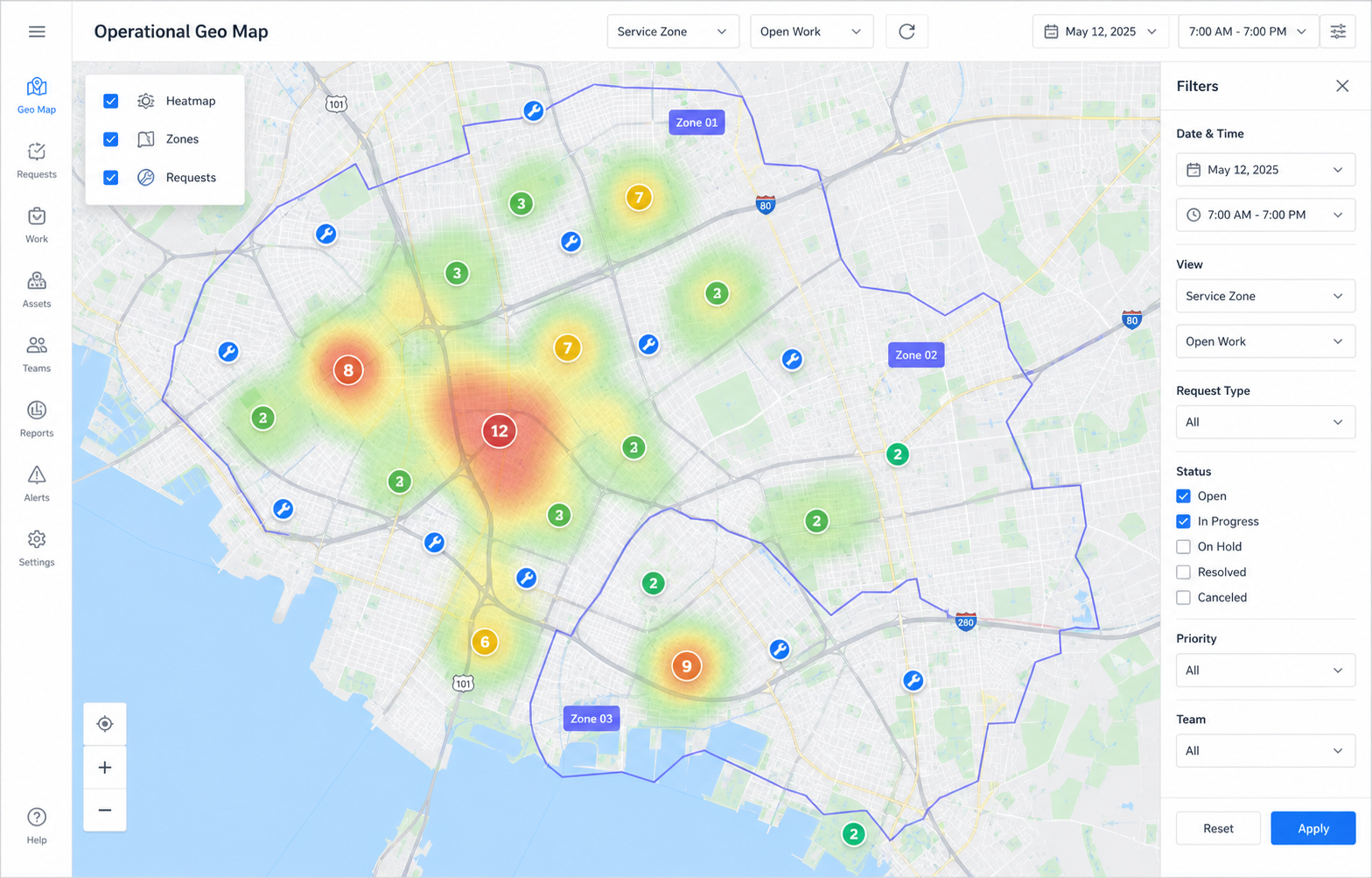
Keep several territory layers side by side: service areas, aid zones, inspection districts, sales regions, or facility zones.
Maps and location routing
Turn addresses into zones, responsibility, and operational action.
Moltaro GEO lets teams define zone sets, draw or import hierarchical territories, classify records by address or coordinates, filter operational maps automatically, and assign the right team before work moves.
A record with an address or coordinates can be matched to the right zone, with ambiguity, stale data, and no-zone cases visible.
A location can select the team, board context, access scope, SLA path, and audit explanation before work moves.
Operating model
Geography becomes a decision input, not a side map.
Maps are useful, but the stronger promise is what happens after Moltaro understands where a record belongs.
Draw or import territories
Create arbitrary polygons, import GeoJSON, use Google search to find places, and keep the final editable boundary in Moltaro.
Classify located records
Addresses, coordinates, assets, sites, beneficiaries, inspections, visits, and requests can be classified into zone sets.
Filter maps and reports automatically
The same classification can drive map layers, heatmaps, record filters, dashboards, and operational reports.
Assign responsibility from location
Zone policies can suggest or apply the responsible team, board route, access scope, and fallback review path.
Zones and territory layers
Zone sets keep territory logic explicit.
A team rarely has one geographic truth. Moltaro separates territory layers so each operational decision can use the right geography.
From a city district to a service polygon
Zones can represent countries, regions, districts, neighborhoods, delivery areas, campuses, buildings, or small hand-drawn service territories.
What Moltaro owns
- Named zone sets for different operational decisions.
- Hierarchical zones with parent and child territories.
- Editable polygons, imported GeoJSON, and geometry revisions.
- Conflict rules for overlapping territories and priority exceptions.
- Classification results that reports, boards, maps, and packages can reuse.
One address can answer several questions
The same record can belong to a humanitarian coverage zone, an inspection district, a delivery area, and a reporting region at the same time.
Rules stay explainable
- Priority can override a normal geographic match.
- Smallest matching area can win when specificity matters.
- No-zone and overlapping-zone cases can route to dispatcher review.
- Every assignment can keep the matched zone and policy reason.
Where demand is strong
Location-aware operations are bigger than heatmaps.
The market pain is usually not drawing a map. It is knowing who owns a place, what work is open there, and what should happen next.
Aid delivery and coverage
See households, distribution points, requests, partner coverage, underserved areas, and program activity by zone.
Field service and inspections
Route requests, inspections, maintenance tickets, and visits to the territory team that owns the area.
Sales and partner territories
Assign accounts, leads, partner coverage, and renewal responsibility by region without losing the record history.
Assets, facilities, and campuses
Manage equipment, sites, facility zones, service points, and inspection obligations across physical areas.
Public-sector and NGO programs
Tie cases, grants, outreach, referrals, and service eligibility to districts, municipal areas, or program-defined zones.
Logistics and appointments
Use zones, windows, capacity, and distance signals to decide where work belongs before scheduling grows complex.
Google plus Moltaro
Use Google where it helps. Keep Moltaro as the operational truth.
Google can help validate addresses, find places, estimate distance and travel time, and center maps. Moltaro keeps polygons, zone rules, assignments, audit, access, and reports under your control.
Address confidence
Normalize addresses, geocode coordinates, show confidence, and flag missing, ambiguous, or stale location data before routing depends on it.
Place search for zone work
Find a city, district, facility, or landmark quickly, then draw, import, or adjust the zone boundary Moltaro will own.
Distance and travel-time signals
Use distance and estimated travel time as ranking signals for team choice, escalation, route suggestions, or appointment planning.
Coverage gap analysis
Compare demand heatmaps, open work, team coverage, and zone capacity to see where responsibility or service is missing.
Routing suggestions
Suggest the team, board, SLA path, and access scope from zone and distance signals while preserving override and audit.
Open geodata imports
Bring in GeoJSON, KML, administrative boundaries, customer territories, or program zones and turn them into governed Moltaro layers.
Connected operations
GEO is stronger because it is connected to records, boards, reports, and access.
A map layer becomes valuable when it can change how work is assigned, what a team can see, and how the operation is reported.
Boards get the right context
A zone match can select the board route, stage context, responsible team, and fallback dispatcher flow.
Access follows responsibility
Territory ownership can help decide which team receives visibility without opening the entire dataset.
Reports read the same facts
Coverage, demand, overdue work, and delivery metrics can be sliced by the same zone sets used for operations.
Bring one location-bound process into Moltaro.
Start with the zones, records, map, and routing policy that decide who should own the next piece of work.